
Yinxiang Assistant - Stop Being Held Hostage by Evernote
In the world of note-taking, who hasn't heard of "Evernote"? Its international version was founded in 2008, and the localized Chinese version, "Yinxiang Biji" (印象笔记), entered China in 2012, operated independently by Beijing Yinxiang Biji. I’ve been a fan since 2009, starting with the international version and later switching to the Chinese version as international sync speeds slowed down. I've watched Yinxiang evolve over the years. Its slogan has remained the same: "Your Second Brain," promoting the "Collect, Organize, Share" methodology, which was my go-to knowledge management strategy back then.
It has these core strengths:
- Powerful Information Collection: Clips webpages quickly, supports drag-and-drop for common file formats with automatic indexing/syncing, and integrates with numerous third-party apps like WeChat. It's safe to say it's one of the most powerful information collection tools available.
- Cross-Platform Sync: Windows, Linux, macOS, iPhone, Android, Blackberry, and WeChat Mini Programs. Whatever platform you use, Yinxiang is likely there, keeping your data in sync.
- Generous Free Tier: The basic features are free and usually sufficient for non-power users.
However, as I used it more and my personal knowledge management needs matured, several issues emerged:
- Bloat and Lag: With over 20,000 notes, my "Second Brain" became overwhelmed. Typing became laggy, and searches took forever, making the software nearly unusable.
- Weak Organization: While great at collecting, it's poor at organizing. Raw information is useless without reflection and digestion. The most natural way to organize knowledge is through simple nested tree structures (folders within folders). Early Yinxiang didn't support folders at all, and even now, it only supports one level of nesting, which doesn't solve the problem. Many users try to use Tags, but that’s tedious. Furthermore, the formatting tools are weak; the Markdown support added years later still lacks real-time rendering like Typora. This made it difficult to digest and organize the massive amount of information I had collected.
- Vendor Lock-in: When newer note-taking apps emerged, I tried to export my notes. I found that exporting tens of thousands of notes was nearly impossible. The company seemed to intentionally make data portability difficult for commercial reasons. On macOS, selecting more than 20 notes for export would crash the app. Even worse, in recent years, they replaced the open
.enexformat with a proprietary, encrypted.notesformat. This meant you couldn't easily migrate your data to other software, forcing you to stay within their ecosystem. This was a deal-breaker for me. - Intrusive Ads: Pop-up ads started appearing even for premium members, with no way to disable them. A knowledge management tool should focus on its core purpose, not on annoying customers with bells and whistles. I knew it was time to leave.
How to escape? After a decade, I had accumulated many valuable, well-digested notes. I needed a way to export them. I preferred Markdown for my notes, so I decided to migrate to Obsidian. However, I couldn't find a reliable export tool. After struggling with isolated data for a while, I decided to build my own tool. After a few nights of coding, Yinxiang Assistant was born. It has two core functions: "Sync and download data from Yinxiang" and "Export notes to .enex files."
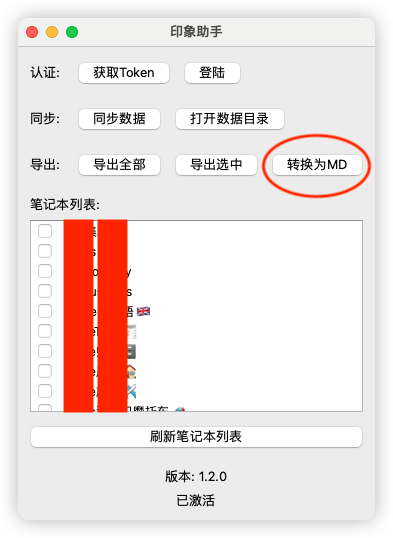
Using it is simple:
- Click "Get Token" and log in.
- Click "Sync" to download your notes to a local directory.
- Click "Export" (or select specific notebooks and click "Export Selected") to generate
.enexfiles in your directory.
This tool solved several of my pain points:
- Data Ownership: I no longer worry about my notes being held hostage on a platform.
- Local Backups: With data stored locally, I can create monthly "snapshots" of my notes, making it easy to recover anything accidentally deleted.
- De-cluttering: I can export and archive notes I don't currently need, keeping my active Yinxiang database lean (under 5,000 notes), which keeps the software running smoothly.
- Optimized Workflow: I now use Yinxiang solely for collecting raw information. Once I've digested and summarized that information, I export the result to Obsidian and delete the raw source from Yinxiang. This play to the strengths of both tools.
The world is a much better place now. I’ve also polished the app to support Windows, Linux, and macOS, making it a truly cross-platform solution.