
A Simple and Effective Method for Building a Private Knowledge Base
Challenges of AI Private Deployment
- High initial investment: Buying high-performance servers and graphics cards can cost tens of thousands of dollars for personal deployment.
- High technical barrier: Current terminal software is not yet extremely user-friendly. It requires command-line usage or an understanding of virtualization/containerization, which is inconvenient for non-professional users, especially during upgrades or troubleshooting.
Significance of Private Knowledge Bases
The AI field is currently in an arms race among major players. While users can access many free resources now, what happens after the market is settled? Platforms often "fence in" users and start charging fees. It's frustrating to have important personal data locked into a platform where you're forced to pay annual fees, and the platform restricts data retrieval. "Evernote" is a classic example of this—it started as a great tool but eventually became cluttered with ads while making it hard for users to leave.
Our philosophy is: the more important something is, the more you should control it yourself. Platforms should be tools that empower us, not vice versa.
Therefore:
- Sensitive or proprietary data should not be uploaded to the cloud.
- Core data should be protected from platform lock-in.
Core Principles
For average users, it's enough to understand that AI models consist of "Embedding Models" and "Generative Models":
- Embedding Model: Converts local documents into a searchable format ("Vector Database"). It returns relevant content based on your keywords.
- Generative Model: Processes your questions and context to reason and organize answers into logical language.
Running an embedding model doesn't require massive resources, but generative models are extremely resource-intensive—which is why NVIDIA GPUs are so expensive and only tech giants can afford massive AI platforms.
For example, running the BAAI/bge-m3 embedding model on a 32GB Mac can still be slow (taking 10 seconds per Word document). While manageable for small datasets, it's inefficient for thousands of files.
For generative models, small models like deepseek-r1:1.5b run smoothly but lack reasoning quality. Larger models like deepseek-r1:14b or above can be painfully slow on consumer hardware, making them less productive.
Building Methods
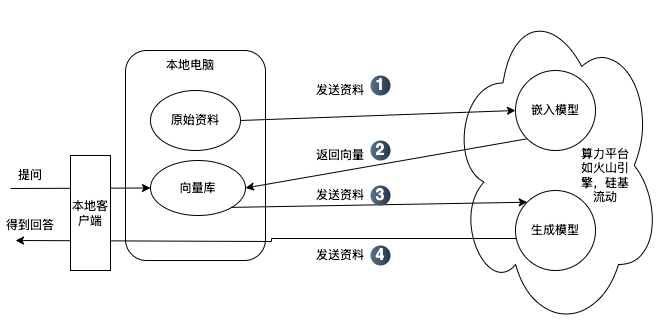
From a user perspective, there are two main scenarios:
- Large data volume / Average PC performance: Use a local client combined with an AI API provider. The "original data" stays local. You use the provider's API for the embedding model to create a "Vector Database" on your machine. When you ask a question, the local client searches the local vector database for context and then sends that context to the cloud API for the generative model to produce an answer. Pros: Your original files and processed vector data stay local. Even if the data passes through the platform's API temporarily, you retain control and can switch providers easily if needed.
- Small data volume / High PC performance / High sensitivity: Consider full local deployment. Both embedding and generative models run on your machine. Pros: Data never leaves your local network, ensuring maximum privacy.
The Simplest and Most Effective Method
The two most popular free clients are Cherry Studio and AnythingLLM. We recommend Cherry Studio for its rich documentation and ease of use.
- Register with a compute platform: Get an API token. We recommend SiliconFlow as their
BAAI/bge-m3embedding model is currently free. - Add the platform to Cherry Studio: See the guide here.
- Add embedding models and knowledge bases: See the guide here.
- Data backup: Learn about local data storage here.
To get high-value answers, high-quality original data is key. We tested this by importing several GBs of financial research documents into Cherry Studio using BAAI/bge-m3 and deepseek-r1-250125. The results were highly satisfactory, even providing citations for verification.
Reminders
- Choose the right model: Different needs require different models. Use "Reasoning" models like
deepseek-r1for strict logic and accuracy, and "General" models likedeepseek-v3for creative writing. - Be patient: Reasoning models take time to "think". Don't assume the program has crashed.
- Questions?: Contact us via our WeChat Official Account "Wisdom Valley" (智慧谷星球).